April 28, 2010

HTC Incredible vs. Apple iPhone 3GS

Does the much-hyped HTC Incredible really live up to its name? We compare spec-by-spec versus Apple’s iPhone 3GS to find out.
I have little doubt that HTC’s Incredible is king of the Android mountain for the time being. But even if it stares down at the myTouch puttering around in the foothills and the Droid on a craggy outcropping just below, it still has to measure up against that veritable Everest in the distance: Apple’s iPhone 3GS. How does the HTC Incredible measure up? Break out the altimeter and sextant, we’re going to find out.

Display

Winner: HTC Incredible
Few iPhone owners really complain about the 3.5-inch screen on the iPhone, but the HTC Incredible really has it beat in every regard. Besides measuring up larger at 3.7 inches diagonally, it boasts 480-by-800 resolution. As astute mathematicians will notice, that’s more than twice the resolution in Apple’s 480-by-320 LCD. Because it uses OLED display technology, it should also offer much brighter, more vibrant colors side by side, as the Nexus One does.

Processor

Winner: HTC Incredible
Much as with the Motorola Droid, the beastly Qualcomm Snapdragon 1GHz chip powering the Incredible puts the 600MHz Arm Cortex A8 in Apple’s iPhone to shame. However, it’s worth noting that the iPhone has a dedicated PowerVR graphics processing unit, which endows it with gaming prowess well above and beyond what the CPU alone would lend.

Camera

Winner: HTC Incredible
Apple must plead no contest in this department. The iPhone 3GS has a 3-megapixel camera with autofocus, but no flash or manual controls. The Incredible offers an 8-megapixel shooter with dual-LED flash, plus on-the-fly adjustments for brightness, contrast, and ISO level. Likewise, the iPhone can only shoot VGA (640 x 480) video, while the Incredible can shoot video at the same resolution as its screen, 800 x 480.

Software

Winner: Apple iPhone 3GS
It’s a matter of taste, to be sure, but the overwhelming public preference still seems to favor Apple’s iPhone OS to Android. And as of iPhone OS 4.0, one of the biggest gripes about it – the inexplicable lack of multitasking – will disappear for good. Put that together with 185,000 apps in Apple’s App Store to about 40,000 in Google’s Android Market, and it’s hard to argue Google holds the upper hand at the moment.

Battery Life

Winner: Apple iPhone 3GS
As with the Droid, we can’t claim to have hammered these out in laboratory tests just yet, but manufacturer estimates usually hold at least some water on cell phones – even if they’re all equally stretched. Apple rates its iPhone 3GS for 300 hours of standby, to the Incredible’s rather sad 146. That’s less than half. However, the Incredible claims 5.2 hours of 3G usage to the iPhone’s 5. When it’s that close, we would just assume call it a draw if Apple weren’t boasting over twice the standby time. On a hardware level, the batteries are nearly identical in capacity: 1219 mAh on the iPhone, to 1300 mAh on the Incredible.

Portability

Winner: HTC Incredible
Similar as they may be, the Incredible narrowly edges the iPhone out in all but what dimension. It’s a fraction slimmer, a fraction narrower, and a fraction lighter, but measures 4.63 inches tall to Apple’s 4.5-inch-tall iPhone. To any reasonable consumer, it’s a draw, but if you happened to be a lightweight backpacker looking for the ideal phone to drag you back to reality as you’re attempting to get away from it all, the Incredible just narrowly wins its place nestled beside the carbon fiber tent poles.

Memory

Winner: Apple iPhone 3GS
Much as with the Droid, you’ll find a different winner here depending on whether you prefer a phone that gives you the most value for your money, or a phone that can theoretically hold the most. The Incredible comes with 8GB of internal memory and a microSD slot that can handle up to a 32GB card (if you format on a PC first). The iPhone 3GS comes with either 16GB or 32GB built in, and no option to add more. Considering the 16GB iPhone and 8GB Incredible both retail for $200 with contract, we think HTC has the win. Technically, the HTC can offer up 40GB with a 32GB card installed, but given the $200 price tag on these cards at the moment, the iPhone still looks like the more practical decision for buyers seeking storage without complete disregard for their wallets.

Overall Winner: HTC Incredible

On paper, the HTC Incredible aces more categories than the iPhone, but without properly weighting the importance of each one, we don’t suggest you take this particular verdict to mean much. Apple’s dominance in software – especially its commanding lead in apps – probably means much more to potential buyers than a few extra millimeters here and there. That said, HTC’s hardware outmaneuvers Apple in just about every way possible, from an improved screen and microSD slot to an incredibly powerful Snapdragon processor and 8-megapixel camera. Is it really the superior phone? Depending on what’s important to you, absolutely.


April 22, 2010

Microsoft Skinput Turns Users Into Touchscreens

New technology from Microsoft projects commands onto your body, and reacts to the movements of your fingers.
The future of technology has always been driven by two simple fundamentals: make it faster, and make it smaller. If Chris Harrison and Microsoft’s newest project, Skinput, takes off, it may just take care of the smaller part for good.
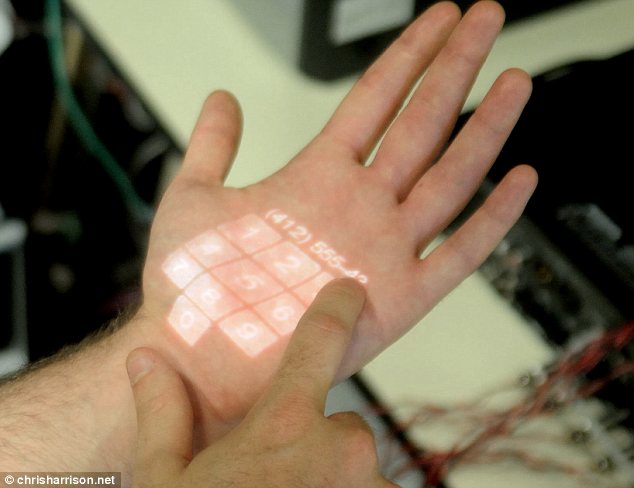
The idea is to do away with physical keyboards altogether and replace them with the user’s own body. A projection system will display the keypad on your arm, then sensors would read the input based on which finger you used, and where it struck. To answer an incoming phone call, you could snap your fingers and a Bluetooth earpiece could take the call. To open a folder, you could touch your pinky to your thumb. A series of sign-language-like controls would be customizable, allowing the user to operate a computerized device without a physical unit.
For the more complex operations that require some form of input, a pico camera would project the menus, folder and keyboards onto the users skin. You could type an e-mail on your forearm, or dial a number on the palm of your hand.
“A technology that appropriates the human body for acoustic transmission, allowing the skin to be used as an input surface. In particular, we resolve the location of finger taps on the arm and hand by analyzing mechanical vibrations that propagate through the body,” the Skinput project website states, “We collect these signals using a novel array of sensors worn as an armband. This approach provides an always available, naturally portable, and on-body finger input system.”
The prototype is an armband that users wear. It features an elbow brace with sensors that can register the movement caused by each finger, and react to the movements. It then identifies the acoustic resonance of each movement and stores it. A camera then projects the more complex menus onto the other forearm, and the user taps on the display, which vibrates to the sensors to accept the command. The system takes a few moments to distinguish the sound, and vibrations of the individual user, and then it is ready to go.
Harrison, a graduate student at Carnegie Mellon University and a former Microsoft research intern, has been collaborating with Microsoft to produce a working prototype. Early results show a 95 percent accuracy rate using five buttons, but the goal is to allow the use of a full keyboard. Promising results for a project just eight months old, but the research team believes that a commercially viable model could be anywhere from two to seven years away.
Without a need for a view screen, mobile devices would be free to shrink down further than has ever been considered pragmatically possible. An iPhone- inarguably a top-of-the-line piece of technology – could suddenly be too bulky, while a unit the size of a matchbook could wirelessly sit in the users pocket and work with the skinput system.
Beyond just applications for mobile devices, the skinput system proves the viability of the human body as a sensor. A decade or so from now, users might snap their fingers to unlock the door to their house, or rub their hands together to turn on the TV. The technology is still in the early days, but the possibilities are remarkable.

Google Doodle Celebrates Earth Day

Most of you know that today, April 22, is officially Earth Day 2010. For those of you who don’t, check out Google, they’re celebrating the 40th anniversary of the annual Earth Day with a new Earth Day doodle, according to the Daily Telegraph.
The search engine’s logo has been transformed into an illustration of a forest. Clicking on the link takes the user to the search results page for Earth Day. Earth Day was first celebrated in 1970 after being founded by US Democratic senator Gaylord Nelson.
This year, Earth Day 2010 will coincide with the World People’s Conference on Climate Change, to be held in Cochabamba, Bolivia, and with the International Year of Biodiversity.
Earth Day has grown since 1970 to become an annual event, celebrated each year on April 22. Earth Day 2007 was reported as one of the largest to date with an estimated billion people participating in organised Earth Day activities across the globe.
The doodle is the latest of Google’s attempts to commemorate people or events on its home page. Previous Google doodles have commemorated HG Wells, the Large Hadron Collider, Salvador Dali and, most recently, Japanese film director Akira Kurosawa.
Google recently launched a ‘Doodle 4 Google’ competition, which invited US children to ‘exercise their creative imaginations’ on the theme ‘If I Could Do Anything, I Would …’. The winning Google doodle will be displayed on the Google homepage on May 27.
The first Google doodle was of the Burning Man Festival of 1998. The doodle was designed by Larry Page and Sergey Brin, Google’s founders, to notify users of their absence in case the servers crashed.
Google doodles have been produced for the birthdays of several noted artists and scientists, including Andy Warhol, Albert Einstein and Leonardo da Vinci. Google Doodles are also used to celebrate historical events. A brick design was used to commemorate Lego’s 50th anniversary.

April 21, 2010

New Life for Old Tires

The process involves freezing old rubber and shattering it into small particles--resulting in new, low-cost materials.
Of the nearly 300 million tires discarded in the United States each year, more than half end up either as landfill or are burned for fuel in cement kilns and in other industries.

Lehigh Technologies of Tucker, GA, has developed a process for rejuvenating discarded rubber that could open up new recycling opportunities. If the company's technology catches on, it could carve out a billion-dollar market for high-performance recycled rubber.
Used rubber is hard to recycle because it is vulcanized--hardened and rendered chemically inert--by the addition of sulfur and other compounds to the material's long molecular chains. Small chunks of used tires can be partially melted and used as filler in asphalt, but devulcanizing rubber involves expensive chemical and thermal processes.
Lehigh Technologies instead shatters rubber into a fine powder using a process that involves freezing old rubber and smashing it to pieces. This starts with tires that have been torn into half-inch chunks using conventional shredding equipment. Lehigh mixes these rubber pieces with liquid nitrogen, cryogenically cooling the rubber to -100°C. The rubber is then fed into a high speed "turbomill" that shatters it into particles no more than 180 microns in size.
Creating such fine powder transforms the rubber from a highly inert filler material to one that can bond with other materials. "We deliver a huge increase in surface area relative to size, and that allows for a much more intimate mixing with other materials," says Lehigh Technologies CEO Alan Barton.
In 2006, Lehigh Technologies opened its first commercial facility, which has a capacity to produce 100 million pounds of rubber powder and to process four million tires per year. Sales of the company's products increased by 40 percent last year, but the facility is still operating at less than half capacity. Barton says that his firm has sold recycled rubber to a number of leading tire manufacturers. He estimates that 30 million tires now on the road in the United States are made in part with his company's recycled rubber, although only about 3 to 7 percent of all the rubber in these tires is their recycled material.
This is largely because Lehigh's rubber is still technically vulcanized. Carbon atoms in the rubber are still bound to sulfur atoms, and these bonds prevent them from forming covalent bonds with surrounding materials.
The company recently opened an in-house research center that is looking to change the chemical properties of powders it produces, to make their surfaces more reactive. The company has also developed ways to make recycled rubber bind to surrounding materials via noncovalent, intermolecular bonds.
Nearly a third of Lehigh's annual output also goes to specialty applications, from paints and coatings to injection mold plastics. Lehigh's PolyDyne and MicroDyne powders can be used to replace as much as 40 percent of the polymers that normally go into plastic.
PolyDyne, the larger and less expensive of Lehigh's two rubber powders, sells for just under 50 cents a pound; finer grained MicroDyne requires colder temperatures and higher milling speeds, making it significantly more expensive. PolyDyne is half the cost of nonrecycled synthetic rubber, a third of the price of natural rubber, and nearly half the cost of polypropylene, a polymer commonly used in plastic moldings.

This is an area that Lehigh's investors are particularly interested in.
"Pick whatever plastic product you want to make and it will have specific technical performance requirements," says Ben Kortlang a partner at venture capitol firm Kleiner Perkins Caufield & Byers, which recently invested in Lehigh Technologies. "Using a blend of PolyDyne and traditional materials, there will typically be a cost savings and, in many cases, a performance improvement. And many of these markets could be very, very large."

April 20, 2010

Backup your Gmail Inbox Online

gmail logoIf you want to backup your emails from Gmail to the local computer, enable POP3 access in your Gmail settings and then use a desktop mail client to download a copy of all your messages from the Google cloud to the local disk. That’s easy!
Windows Live Mail, Outlook and Thunderbird are some nice email clients that can automatically and easily bring your entire archive of Gmail messages offline.
Why you should backup Gmail to the cloud?
If you are not a huge fan of desktop applications or if you think that setting up a Gmail backup plan involves way too much effort, you can consider creating a backup of your Gmail account in the cloud itself. Before we get into the details, here are three situations where an online backup of Gmail messages will come handy:
Reason #1 – If your main Gmail account gets hacked , you will still have access to all your previous emails.
Reason #2 – If you delete an important email from your Gmail Inbox by mistake, you can easily retrieve it from the online backup. Google Apps Premier has Postini to restore deleted emails, here you’re getting that facility for free.
Reason #3 – If the Gmail service goes down (yes, it happens), you will still be able to read your older emails. Gmail outage won’t affect work.

Backup your Gmail Messages Online

There are three services that can help you automatically backup your Gmail (and Google Apps) email accounts online and luckily, they won’t cost you anything.
gmail mail fetcher
The first and most obvious choice is Gmail. Create a new Gmail account and under Settings –> Accounts and Import –> Check mail using POP3 –> Add POP3 email account, enter the email address of your main Gmail account that you want to backup.
Within an hour or so, the online mail fetcher program will pull messages from your main Gmail account and will copy them to your new “backup” account. In my limited testing, I found that Gmail’s mail fetcher left all the messages that were either “read” or have been previously downloaded by another POP3 client so it’s not “true backup.”
That brings us to another alternative – copy your Gmail mailbox to Windows Live Hotmail. While you can add a Gmail account to Hotmail using POP3 (just like Gmail’s mail fetcher), there’s a much better and reliable option out there for copying emails from Gmail into Hotmail and it’s called TrueSwitch.
Copy Gmail Messages to Hotmail
Setup a new Hotmail account and TrueSwitch, an awesome web-based email account migration service, will copy all your emails and attachments from Gmail to your new Hotmail address. If you have a relatively large Gmail Inbox, the backup process might take up to 24 hours but you’ll get an email as soon as the transfer is complete.
Like Gmail, Hotmail too offers “expanding” storage so it can possibly fit your large Google inbox as well. You can then add your Gmail address to Hotmail and this will ensure that new messages that land in your Gmail inbox in the future are also saved in Hotmail.
That said, both the services discussed above have one common drawback – they’ll always backup your entire Gmail mailbox and you cannot limit the backup process to a specific set of folders (or labels in Gmail). So if you have a fairly large mailbox and don’t want to backup each and every Gmail folder (or label), try Backupify.
backup gmail folders
Backupify, as you know, can backup your online accounts (including Gmail) to Amazon S3 and a unique point about Backupify is that it lets you specify labels that should be included in the backup process. The messages are stored in the cloud as EML files that you can view inside Outlook or, you can change the .eml extension to .mht, and read the file inside IE.
Backupify supports XOauth so you can add your Gmail account to the service without having to share your Google Account credentials. They are not using a very practical format for saving messages but the advantage is that Backupify will scan your selected mailbox folders every single day for new emails and will archive them automatically.